Schedule a Demo

Automations

Flexible automation for when hiring gets complex

Pinpoint’s Automations give you the freedom to create, manage, and run automated hiring processes across every role and region, while keeping your candidate experience consistent and personal.

Automations that scale with your process

Build once and apply everywhere. Create connected workflows that adapt to different roles, regions, or conditions so you can manage complex hiring from a single place.

Built-in compliance and control

Automate required steps, approvals, and escalations so processes stay consistent and auditable, no matter who’s hiring or where.

A better experience for candidates and teams

Set up personalized messages, automate follow-ups, and keep every candidate moving while your team focuses on people, not admin.

Build automations your way

Start with a template, or build from scratch

Get started quickly with ready-made Automation templates, based on the workflows recruiters use the most. Or, start with a blank canvas and build an entirely custom automation from scratch.


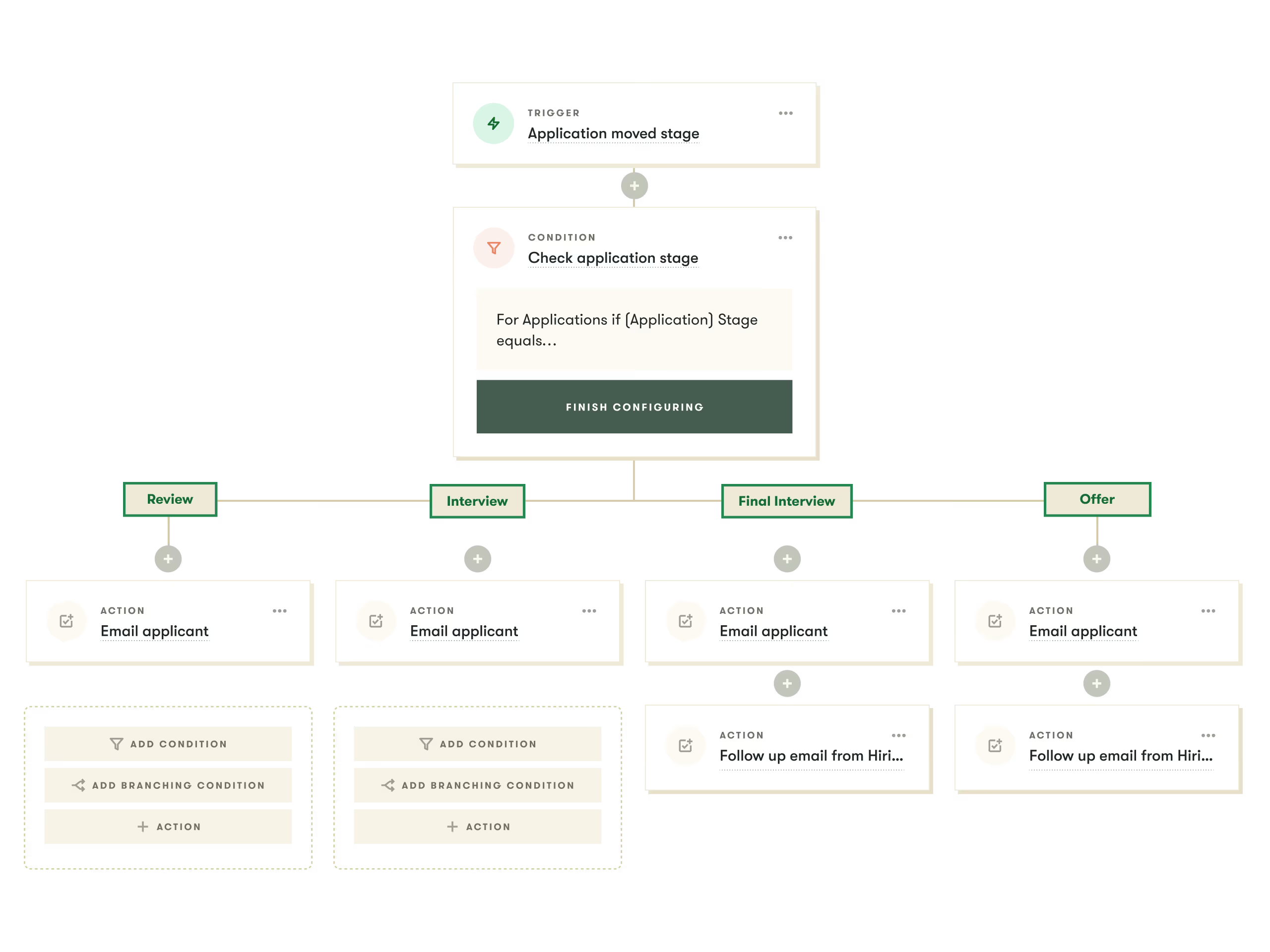
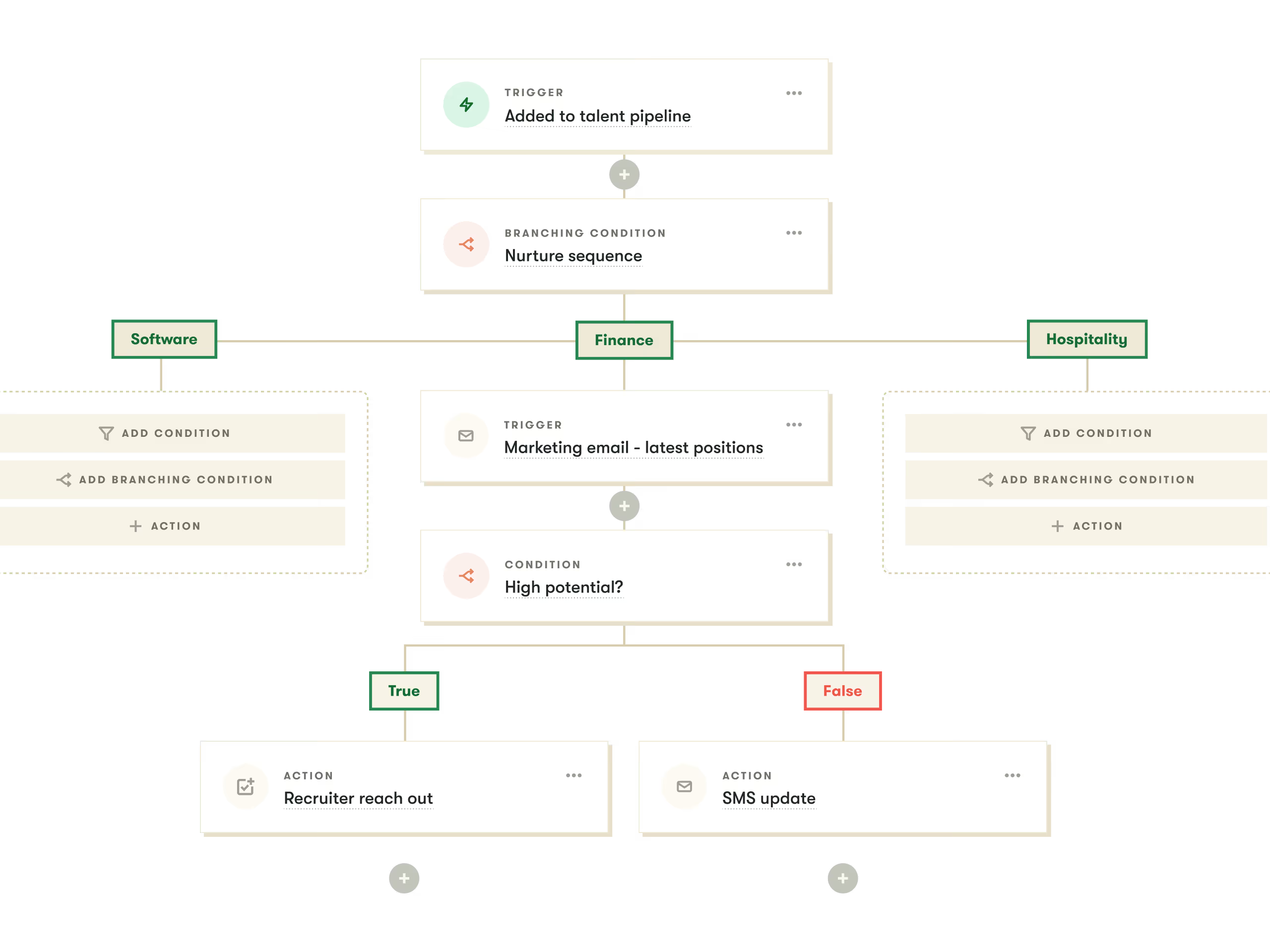
Customize workflows with smart branching logic

Use branching logic to add flexibility and precision. Create specific paths for different countries, departments, or conditions so you don’t have to manage separate workflows for every single time.
The automations really allow us to be in the field recruiting, talking with candidates, while we know Pinpoint can take care of the backend stuff for us.”
Haydan Hastings
STG Logistics

Add advanced triggers and conditions

Automate actions when key events happen, such as new applications, job updates, offer creation, application count, or job status changes.

Automate actions across your process

Move candidates between stages, send personalized emails or SMS, update job statuses, and more. Build workflows that keep everything in sync without the manual effort.

27 recruitment automation templates, from simple to advanced

We want to encourage recruiters think bigger and expect more from automation. So we’ve created a 4-part series of templates to inspire you.

Example of a workflow automation in Pinpoint
Pinpoint’s automations have completely changed how I work. Tasks that once took days now happen in minutes, and the process runs on its own. Hiring managers even asked if I’d been working weekends because everything kept moving. It’s given me back hours every week and made the whole process run far more efficiently.
Jed Shaw
Talent Acquisition Manager, CDL

Frequently asked questions about automations

Q

How does automation in Pinpoint compare to other applicant tracking systems?

A

Pinpoint offers one of the most advanced automation systems available in an applicant tracking system today—designed for mid-sized and enterprise teams managing high-volume, multi-location, or complex hiring. While many ATS platforms only support basic triggers (such as sending emails or moving candidates at single stages), Pinpoint’s automation engine is built to handle organisation-wide workflows that scale across roles, teams, and regions.

Pinpoint includes:

  • Advanced automation logic: including multi-step workflows, branching conditions, cross-job actions, and triggers tied to applications, jobs, offers, pipelines, and user activity.

  • Build-once, apply-everywhere workflows: so talent teams can maintain consistency across thousands of roles without recreating automations job-by-job.

  • Compliance-ready controls: every action is logged, auditable, and fully visible to your team, supporting highly regulated industries and multi-state hiring.

  • Personalised candidate experiences at scale: with tailored messaging, follow-up flows, and automated nudges that maintain a human feel even in high-volume environments.

Other ATS platforms typically offer more limited automation, often focusing on simple rejection rules, basic messaging, or job-level workflows. Pinpoint’s automation system is built for organisations that need deeper control, flexibility, and visibility, especially when hiring across multiple brands, geographies, or business units.

Q

Which applicant tracking systems use advanced automation features?

A

Several applicant tracking systems now offer advanced automation features that go beyond simple email triggers or knockout questions. A few of the most commonly used include:

  • Pinpoint: Pinpoint’s organisation-wide automations work across roles, departments, and regions. Not just individual jobs. You can trigger actions from applications, jobs, offers, and talent pipelines, use branching logic for different countries or departments, and combine this with AI (for skills tagging, screening, and smart routing) to keep large volumes moving without losing the personal touch.

  • Greenhouse: Greenhouse includes automation features to standardise steps like interview scheduling, reminders, and candidate communications. Its automation tools are typically used to keep structured workflows consistent across hiring teams, rather than deeply custom, cross-job flows.

  • SmartRecruiters: SmartRecruiters offers automation and AI to support sourcing, screening, and candidate engagement at higher volumes. Teams often use it to reduce manual touchpoints in repetitive stages of the process.

Most modern ATS platforms now offer some automation, but the depth, flexibility, and level of control varies a lot. If advanced automation is a priority, it’s worth digging into:

  • whether workflows can be reused across jobs and regions,

  • how easily non-technical users can build and maintain automations, and

  • how clearly actions are logged and auditable.
Q

What can ATS automation actually do?

A

ATS automation helps hiring teams replace manual, repetitive tasks with repeatable workflows that keep candidates moving and reduce admin. What it can do varies by platform, but modern applicant tracking systems typically automate tasks across four areas:

  1. Screening and routing
    Automations can filter candidates based on application responses, tag applicants with relevant skills or criteria, fast-track internal or referred candidates, or route people to the right workflow based on department, location, or seniority.

  2. Candidate communication
    Most ATS platforms can send automatic emails, rejections, and reminders. More advanced systems go further, automating personalised messages, nudges when candidates stall, SMS communications, and different communication flows for different role types.

  3. Workflow management
    Automation can move candidates between stages, assign tasks to hiring managers, update job statuses, enforce required steps, or pause jobs once they reach a certain application volume. In advanced systems, these workflows can be applied across multiple roles, teams, or regions from one place.

  4. Compliance and consistency
    Automated survey sends (EEO, DEI, right-to-work checks), approval flows, escalation rules, and a full audit trail help teams stay compliant – especially in high-volume or multi-location environments.

Across the market, systems vary in how deeply they support this. Some ATSs only handle simple triggers (e.g., send an email when a stage changes), while more advanced platforms like Pinpoint allow you to automate complex, multi-branch workflows that run across your entire organisation and plug directly into your wider hiring process.

If you want to see examples, our 27 recruitment automation templates show what high-impact ATS automation looks like in practice.

Q

How does automation improve recruiter productivity?

A

Automation removes the repetitive tasks that slow teams down, so recruiters can focus on higher-value work like sourcing, interviewing, and partnering with hiring managers. In practice, automation improves productivity in a few key ways:

  1. Cuts out manual admin
    Automations handle tasks like sending rejections, nudging candidates, updating statuses, scheduling interviews, tagging applicants, and moving people between stages. Recruiters spend less time clicking through workflows and more time engaging with qualified candidates.

  2. Keeps every job moving
    Automation prevents slowdowns by triggering follow-ups when candidates or hiring managers stall. This reduces bottlenecks, shrinks time-to-hire, and ensures no applicant gets forgotten in the pipeline.

  3. Reduces context switching
    Instead of setting up the same workflows job by job, advanced systems let you build once and apply everywhere. Recruiters don’t have to rebuild processes, remember steps, or chase people manually.

  4. Improves decision-making
    By automating repetitive tasks, recruiters free up hours each week to review higher-quality candidates, collaborate with hiring managers, and refine sourcing strategies.

  5. Scales without adding headcount
    Automation lets small TA teams manage large hiring volumes, across multiple departments, states, or regions – without sacrificing candidate experience or compliance.

Across the market, platforms vary in how much they automate. Advanced systems like Pinpoint go beyond simple email triggers and support complex branching logic, multi-job workflows, and cross-platform actions that meaningfully expand recruiter capacity.

Q

Does automation replace human decision-making?

A

No. Automation handles the repetitive, predictable tasks in the hiring process, but humans stay fully in control of decisions.

Most ATS automation is designed to support recruiters, not replace them. It takes care of actions like sending messages, moving candidates between stages, enforcing required steps, and triggering follow-ups. These tasks don’t require judgment, so automating them reduces admin without affecting hiring quality.

Advanced platforms like Pinpoint give teams even more control by making every automated action transparent and fully auditable. Recruiters can see what happened, when it happened, and why, and can adjust, override, or switch off automations at any time.

Automation speeds up the process, keeps everything consistent, and reduces errors. But the decisions that matter – who to progress, who to hire, and how to evaluate talent, always stay with your team.

Q

What are the differences between basic and advanced ATS automation?

A

Basic ATS automation typically covers simple, repetitive tasks, things like sending rejection emails, tagging candidates, or triggering messages when an application is submitted or moved to a new stage. These workflows save time, but they usually run at the job level and offer limited flexibility.

Advanced ATS automation goes much further. It allows teams to automate complex, multi-step processes across roles, departments, and locations. This includes branching logic, multi-trigger workflows, conditional paths, SLAs, escalations, job-level actions, offer workflows, and pipeline management. Advanced systems also allow automations to run at an organizational level, so you can build a process once and apply it everywhere.

Platforms like Pinpoint combine this with enhanced visibility and control, with full audit logs, and smart triggers, giving teams the power to automate at scale without losing oversight.

Q

Can automation in an ATS improve candidate experience?

A

Yes, when it’s designed well. Automation helps candidates move through the hiring process faster, receive timely updates, and get a more consistent experience across every role and location. Instead of waiting for manual follow-ups, candidates receive the right information at the right time, whether that’s interview details, next-step guidance, or status updates.

Advanced automation systems, like those in Pinpoint, also allow tailored communication based on role, department, or application stage. This means candidates get personalised messages without teams needing to send them one-by-one.

The result is a smoother, more transparent journey that feels responsive and respectful, even in high-volume environments.

Got 30 minutes?

Schedule a demo to see how Pinpoint can transform the way you attract, hire, and onboard talent.

No hard sell. Just the chance to see if Pinpoint's right for you.