ATS migration guide

Switch your applicant tracking system with your data, your candidates, and your hiring intact

Switching ATS sounds risky, but it doesn't have to be. Pinpoint migrates your jobs, candidates, resumes, and history from any other ATS, and you can run both systems in parallel so hiring never stops.
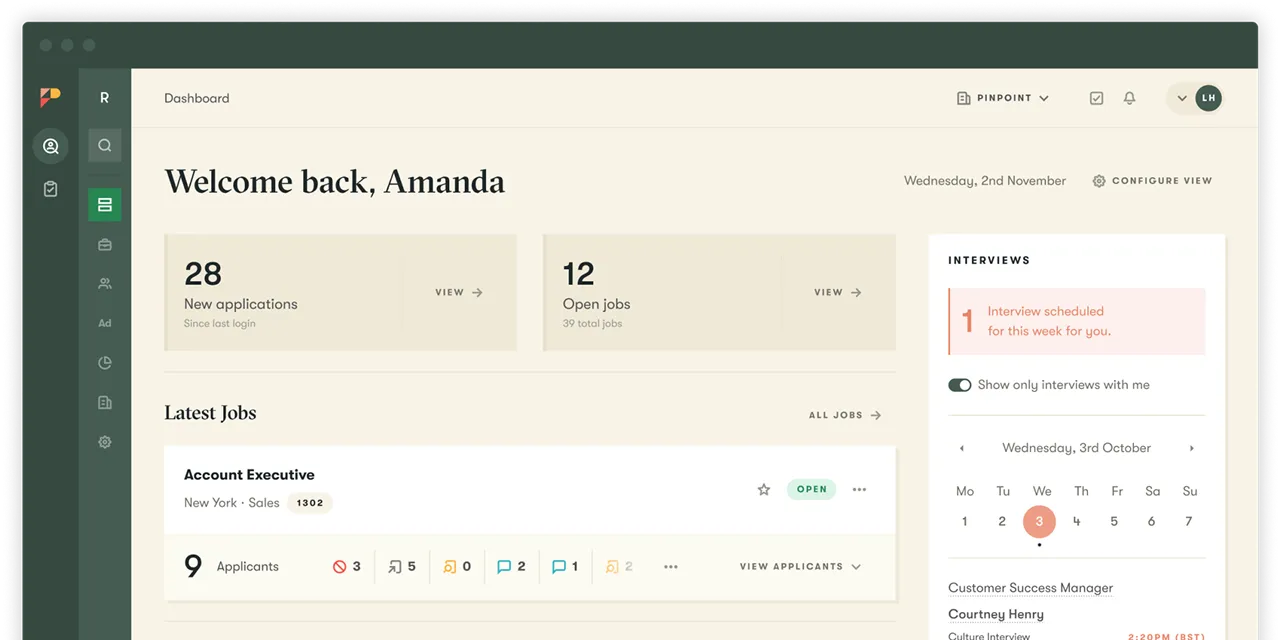

Organizations that hire across regions, brands, and role types run their hiring on Pinpoint

Why teams switch ATS

Most teams don't switch ATS on a whim. They switch when the system they have starts working against them. Hiring managers route around it and run hiring over email and spreadsheets. Candidates drop out of a clunky application flow before they finish. Reporting has to be stitched together by hand because nothing rolls up. The system fits one shape of hiring and nothing else, so multi-stream, multi-region, or seasonal hiring never quite fits. And the integrations that hold the stack together keep breaking.


Switching is how you fix all of that at once: cleaner data, a process your whole team will actually use, and reporting you can trust. The rest of this guide is the practical how: what moves across, how long it takes, and the checklist to run before you start.

Signs it's time to switch ATS

If two or three of these feel familiar, you have probably outgrown your current system.
Hiring managers route around the ATS
The people you most need in the system run hiring over email and spreadsheets instead, so the data is never complete.
Candidates drop off before they apply
A long or clunky application flow loses good people. 60% of candidates abandon an application when it is too long or complex.
You build reports by hand
Numbers live in different places and nothing rolls up, so every report is a manual stitch-together.
It was built for one way of working and fights you on multi-stream, multi-region, seasonal, or deskless hiring.
You pay per seat to involve hiring managers
A per-user paywall pushes hiring work outside the system, which starves your reporting and automation of a complete picture.
Integrations keep breaking
Connections to your job boards, HRIS, and background-check tools need constant babysitting.

How ATS migration works, step by step

Migration (moving your data) and implementation (setting up the platform) are two distinct things that run as one onboarding project, led by a dedicated implementation manager from the day you sign to the day you go live.

Here's how that runs at Pinpoint.

Decide how much to bring across: active jobs plus recent candidates, or your full history. Migration scope is customizable per data type, so you can leave behind data you do not need.

Migrate yourself with Pinpoint's in-platform import tools and the Pinpoint API, or have Pinpoint's migrations team run a managed migration. A managed migration takes 15 business days and is built into your implementation timeline.

Your jobs, applicants with their stage and status, talent-pool and CRM candidates, resumes and associated files, and historic notes and comments all come across.

Pinpoint remaps and tests your integrations: job boards, HRIS, background-check, and assessment vendors, before go-live, so your stack keeps working from day one.

Do a hard cutover, or run Pinpoint in parallel with your existing ATS. Active candidates finish in the old system; new applicants from go-live enter Pinpoint. No hiring freeze.

Getting your team live

Your team won't be starting from a blank screen

A new system only earns its keep if people actually use it. Pinpoint is built so your team is productive from go-live, not months later.
Start with templates, not blank pages
Pinpoint ships with base templates for emails, hiring workflows, workflow automation, and text messaging, so you start from a working setup instead of a blank one.
Get a guided onboarding and a real person helping you
You'll get an onboarding portal with your project plan, learning materials, and milestones, plus a dedicated implementation manager who runs the move from kickoff to go-live.
Our support doesn't end at go-live
A named Customer Success Manager helps you keep evolving your setup as your hiring changes, so you don't end up stuck on a five-year-old configuration the way teams do on the system they're leaving.
Hospitality

65%  

reduction in time to hire

Streamlined

casting day coordination

Increased

candidate communication

“With these new tools, we’ve set a good foundation to scale our hiring while maintaining our culture and delivering a really great candidate and employee experience.”
Michael Easton
Head of Employee Value Proposition, citizenM
Nonprofit

Strengthened

candidate engagement

Increased

candidate trust

Reduced

reliance on paid ads

“Pinpoint has completely changed how we work. We're more efficient, more consistent, and better equipped to give every candidate a great experience.”
Emma Bishop
Resourcing Manager, Blue Cross
Professional Services

Lower

risk of candidates stalling

Improved

visibility for TA leaders and stakeholders

3,500

employees supported in the states

“I just love that I can manage everything and every role in one place without having to jump between systems.”
Liz Mellor
Head of Talent Acquisition for North America, Davies Group
Retail

Centralized

visibility on all candidates

100+

locations supported

Strengthened

hiring manager adoption

“It’s been really lovely using Pinpoint to align things a bit more. Across the board now, all of our candidates are getting a more similar experience, and the communication they’re getting is much stronger.”
Adam Barnes
UK&I Retailer, Lush

Manage every hiring stream in one place

Support multiple roles, teams, and workflows in one platform, with the clarity and consistency your team needs.
G2
4.8
Capterra
4.8
SSR
4.8

ATS migration and implementation FAQ

A managed migration with Pinpoint takes 15 business days and is built into your implementation timeline. Overall implementation runs from a few weeks for small organizations or those with simple requirements to 3–6 months for complex enterprise rollouts up to 20,000 headcount; one Pinpoint customer reached 15,000 hires in 12 months from a 3.5-month implementation.

Pinpoint migrates candidate and hiring data from any other ATS: jobs; applicants with their stage and status; talent-pool and CRM candidates; resumes and associated files; and historic notes and comments. You choose how much history to bring and can leave behind data you do not need.

No. Switching to Pinpoint needs no hiring freeze. You can do a hard cutover, or run Pinpoint in parallel with your existing ATS so active candidates finish in the old system while new applicants from go-live enter Pinpoint.

Both. You can migrate data yourself using Pinpoint's in-platform tools and the Pinpoint API, or choose a managed migration run by Pinpoint's migrations team.

Pinpoint remaps and tests your integrations (job boards, HRIS, background-check, and assessment vendors) before go-live, so your stack keeps working from day one. Pinpoint offers a broad integration ecosystem: hundreds of pre-built connectors, a plugin framework for rapid custom integrations, a modern API, and flat-file integrations for legacy systems.

That is your call. Migration scope is customizable per data type: bring active jobs plus recent candidates, or your full history. Many teams migrate only their active jobs and talent pipeline so the new system starts clean.

No data is left behind unless you choose to leave it. Pinpoint migrates jobs, applicants with their stage and status, talent-pool and CRM candidates, resumes and associated files, and historic notes and comments. Before you switch, export and back up your current data, agree the field and pipeline-stage mapping, and test a sample before the full import.

Every Pinpoint customer gets a dedicated implementation manager from contract signature to go-live, plus an onboarding portal with a project plan, learning materials, and milestone tracking. You also get a named Customer Success Manager, access to the Technical Account Management team, and human support with an average first response under two minutes.

Migration is moving your existing data into the new system. Implementation is the wider project of configuring the system and getting your team live on it. Integration is connecting the ATS to your other tools, like your HRIS, job boards, and background checks. A switch involves all three, run as one project.

Start from how your organization actually hires: across regions, role types, seasonal volume, and desk-based and deskless teams. Look for flexibility, control, and ease of use together, since that combination is what drives adoption and clean data. To compare Pinpoint against a specific system, see our comparison pages.

Moving candidate data to a new ATS is fine as long as you have a lawful basis to process it, and Pinpoint keeps the mechanics straightforward. You choose exactly what moves, so you only bring across data you need; customer data is stored in UK and European data centers, with your choice of location; and your hiring records stay audit-ready throughout. Pinpoint is ISO 27001, ISO 42001, and SOC 2 Type II certified.